Finding the Transaction Code for the Task You Want to Start
Finding the Transaction Code for the Task You Want to Start 
Prerequisites
Before you can use a transaction code, you must find the transaction code for the task you want to start.
Procedure
To find a transaction code for a certain task, place the cursor on the appropriate function (that is, menu item) in the SAP Easy Access workplace menu, and either:
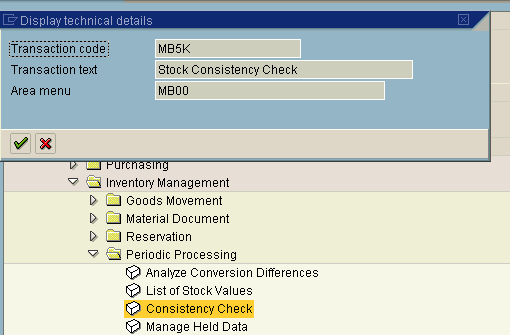
- Choose Extras ® Technical details.
A dialog box appears displaying the details for the selected menu item, as in the following example:
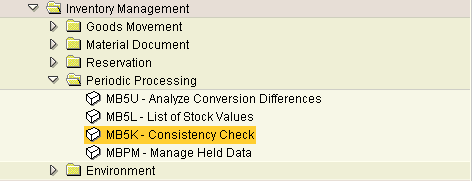
- Or, choose Extras ® Settings ® Show technical name.
The menu closes. When you reopen it, the system displays the transaction code (not only for the selected item, but throughout the workplace menu), as in the following example:
Result
You can start the task now by double-clicking it, or by choosing Enter. You can also use the transaction code to start this task from any screen in the SAP System. When you use a transaction code to start a task, the SAP System ends your current task and then displays the initial screen of the new task.
Created with the Personal Edition of HelpNDoc: Make the switch to CHM with HelpNDoc's hassle-free WinHelp HLP to CHM conversion tool